
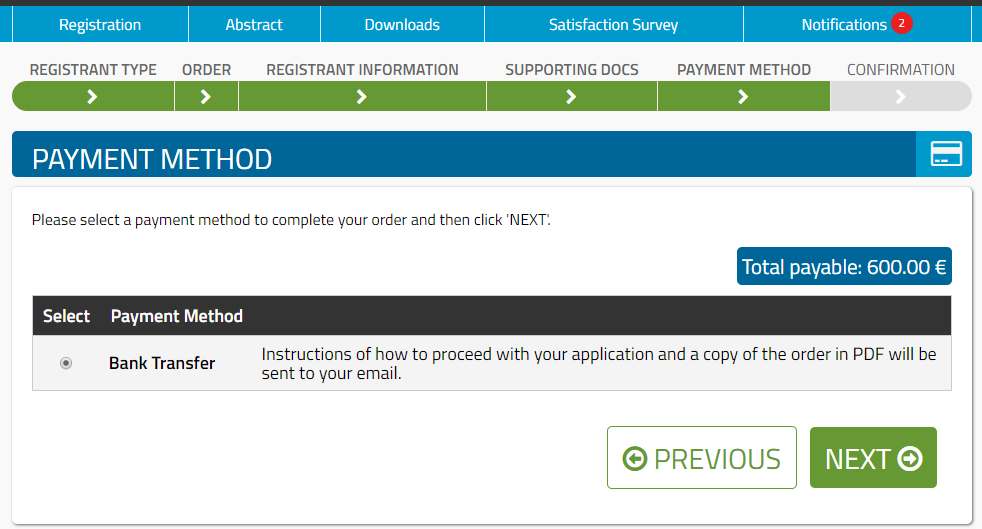
Payment method selection is the last step for completing an order on registrants' web accounts. For Advanced Course Admins, two payment method options have been preconfigured.
Bank Transfer for payable registrations. And Waiver for invited guests with free of charge registrations
To edit a payment method option:
- Navigate to Registrations >> Payment Methods
- Double click on the one that you would like to make changes to.
- Edit the fields on the form as needed. Use the "i" icons for guidance.
- Click "Save".
In principle for the Bank Transfer method, you would only need to update the Payment details displayed on orders and the 'Order Complete' Email and On-Screen Messages. Please update this email message template with your instructions/information required.
On the message templates you may find at your disposal a few merge tags. These are placeholders that are automatically replaced with real information when messages are displayed / emails are sent out.
- [first_name] = Registrant first name
- [last_name] = Registrant last name
- [event_name] = Title of the course
- [order_num] = Order ID
- [email_address] = Registrant email address
- [amount_due] = Order total amount
For additional information on the pre-configured payment methods, please see the Help Centre page on Bank Transfers and Waivers
For additional information on enabling payments via credit/debit card through the website, please see the article on Credit/Debit Cards.
Please continue to Order Form & Receipt Details.
Comments
0 comments
Please sign in to leave a comment.