
To give permission to appraise abstracts individually:
- Navigate to Abstract Appraisal >> Permission for Individual Appraisal.
- Click the green "Add New" button.
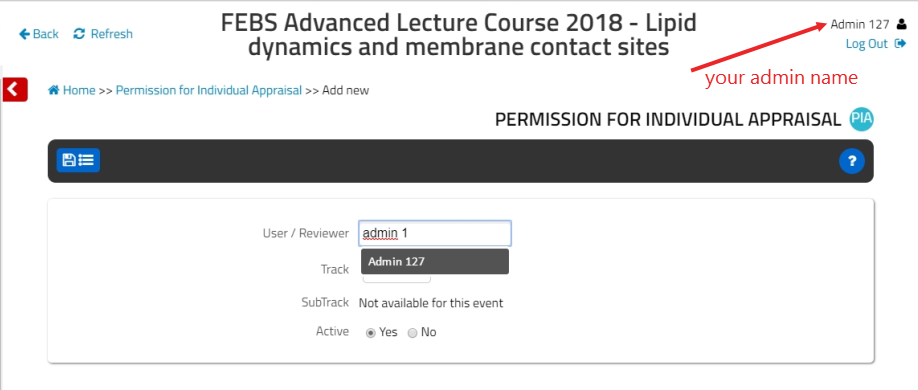
- Type in your Admin / Reviewer Name in the box and pick it from the drop-down list.
- Select from the Track / Topic lists to give permission to appraise abstracts within that specific track / topic.
- Ensure that you select Yes to Activate permission for this Reviewer.
- For Advanced Courses, ensure that you select Yes to Moderator* and No to Marker to assign proper roles*.
- Click the blue Save icon at the top left of the page.
*For Advanced Courses, it is advised to activate the moderator role only. For the FEBS Congress, Marker and Moderator roles should be assigned as required for Congress Abstract Appraisal.
If you would like other people to appraise submitted abstracts, then supply names and emails of those external people to support@effi-sciences.com. Reviewer accounts to use the Appraisal Dashboard will be created for them, and each of them will receive a notification from noreply@YOURSUBDOMAIN.febsevents.org with login instructions.
Once the accounts are created and they set a password according to login instructions, a quick guide to the abstract appraisal access for external reviewers is:
- Log in to the control panel
- Go to ‘appraisal dashboard’
- They will only see abstracts on the track and topics they have been individually given permission for.
- Click 'PDF' to view each abstract
- Approve, Reject, Mark, and Email abstract submitters by clicking the colour square buttons of each of the displayed abstract records.
Note that permission for admins / reviewers that have approved or rejected an abstract cannot be deleted. They can only be activated or deactivated.
To approve abstracts individually, please continue to Approve Abstracts Individually.
Comments
0 comments
Please sign in to leave a comment.